Dotwatt
development One-time paymentA battery manager for the Mac menu bar that shows what drains your MacBook
Dotwatt is a development tool built by @kosyrau designed for MacBook users on Apple silicon who work away from the charger, and developers who run coding agents. A battery manager for the Mac menu bar that shows what drains your MacBook Solves key challenges around the mac battery icon shows a percentage, not how long the charge will last or which app is draining it; the charge limit and low power mode are buried in system settings. Pricing model: one-time payment.
About Dotwatt
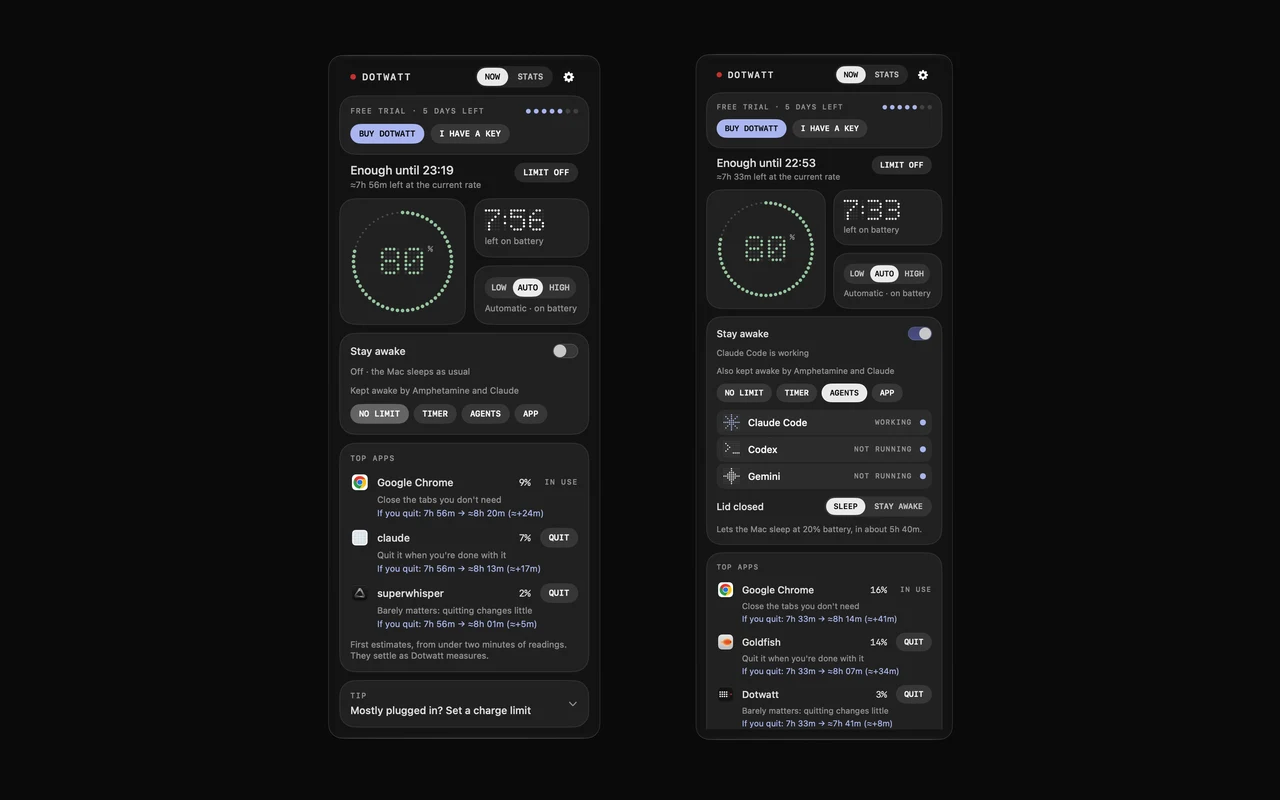
The battery icon on a Mac shows a percentage, not how long it will last or what is draining it. Dotwatt replaces it with a menu bar panel: time left measured after you unplug, the apps spending the charge (quit one and see the time gained), a charge limit from 80 to 100% on macOS 26.4 or later, Low, Automatic and High Power in one click, and stay awake while coding agents work. For MacBooks with Apple silicon on macOS 14 or later. No account, no telemetry. One payment from $2.99, 7-day free trial.
Product Overview
Who is it for?
MacBook users on Apple silicon who work away from the charger, and developers who run coding agents
What makes it unique?
Measures the time gained after you quit an app, and keeps the Mac awake only while coding agents work
Problem it's solving
The Mac battery icon shows a percentage, not how long the charge will last or which app is draining it; the charge limit and Low Power Mode are buried in System Settings.
Solution it's providing
A menu bar panel with measured time left, the apps spending the charge, an 80 to 100% charge limit, power modes in one click and stay awake for coding agents.
Specifications & Taxonomy
Alternative to
Built by
by @kosyrau
Independent maker on ShowBuild
AskMed: showing the time gained after quitting an app is a clear way to explain battery drain. It would help to show the measurement window next to that estimate, so users can distinguish a brief spike from sustained usage.